Automatic Item Sorter with Overflow Protection
Keep Your Storage Always Organized
Keep Your Storage Organized Without Breaking the Filters
An automatic sorter separates selected items into dedicated chests while sending everything else to an overflow chest. Proper overflow protection also keeps a full destination from disrupting neighboring filters. These are separate jobs: a catch-all chest handles unmatched items, while a carefully limited filter inventory prevents excessive redstone signal strength.
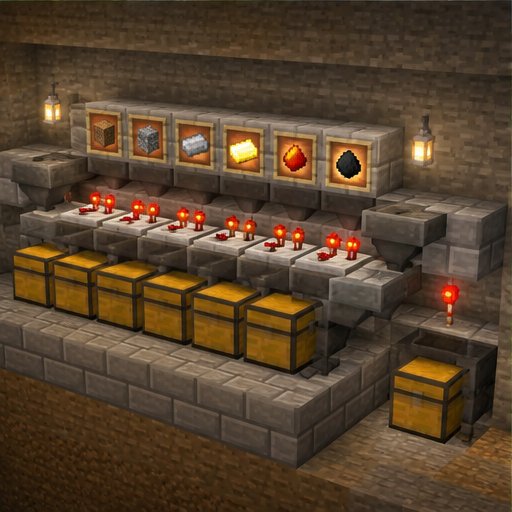
This guide uses ordinary hoppers and a comparator threshold circuit for items that stack to 64. Build and validate one isolated cell before duplicating it. Basic hopper filtering works in vanilla Java and Bedrock, but compact redstone layouts are not automatically interchangeable between editions. Server plugins that change hopper transfers or redstone behavior can also affect operation.
Understand the Filter Before Building
Each cell has three hopper levels: a transport hopper at the top, a filter hopper beneath it, and an extraction hopper below the filter. The extraction hopper points into storage. The filter hopper points sideways into something that cannot accept items, rather than downward, so it cannot push its reserved inventory into storage by itself.
For a 64-stackable target, place 41 target items in the filter’s first slot and one renamed, 64-stackable filler item in each remaining slot. That inventory produces comparator signal strength 2. One additional matching item raises the signal to 3, triggering the circuit to unlock the extraction hopper. As items leave, the signal falls and extraction stops. This is threshold-controlled transfer, not a universal “one-item pulse” mechanism.
If storage fills, the target slot can reach 64 while the four fillers remain unchanged. The comparator still outputs only strength 3. This limited maximum is what makes the inventory pattern suitable for overflow-safe filtering; the wiring must also prevent unwanted interaction between cells.
Materials for a Starter Cell
For one isolated cell with a hopper transport line, prepare three hoppers, one storage chest, one comparator, one threshold repeater, one redstone torch, solid building blocks, and redstone dust. Dust and support-block quantities depend on how far apart you place the circuit components. Add an input chest above the transport line and an overflow chest at its end; longer lines need additional transport hoppers.
Prepare 41 matching target items and four renamed filler items per cell. Use an anvil to rename a common item that stacks to 64, then place one in each filler slot. Keep that exact renamed item out of the input: if it enters, it can stack with the fillers and invalidate the protection. Unnamed versions will not stack with renamed fillers.
Build and Validate One Cell
Step 1: Place the destination chest and an extraction hopper pointing into it. Above that hopper, place the filter hopper, pointing sideways into a solid block. Check the hopper spouts carefully. Leave space behind the filter for its comparator and plenty of room around the extraction hopper for its locking circuit.
Step 2: Place a transport hopper directly above the filter. Point it horizontally toward the next transport hopper or the final overflow chest. Attach the input chest above the beginning of this line. Use a hopper line for your first build: it avoids water alignment problems and exposed item entities that can despawn.
Step 3: Place a comparator directly beside the filter, pointing away from it, in normal comparison mode. Run three consecutive redstone dust pieces straight away from its output. With signal strength 2, only the first two dust positions receive power; with strength 3, the third receives power too.
Step 4: Put a repeater immediately after the third dust, facing away from the comparator. Its input must come only from that third dust. The repeater turns the weak threshold signal into a full-strength output. Keep other powered blocks and wires away from this detector so they cannot bypass the threshold.
Step 5: Route the repeater’s output to a solid block with a redstone torch attached to its side. This is the inverter: powering the block turns the torch off. Route the torch’s output to a separate solid block beside the extraction hopper, using dust or a repeater aimed into that block. Ensure this locking block powers only the extraction hopper, not the filter or transport hopper. Keep long dust runs within signal range, adding repeaters where necessary.
Step 6: Leave the transport line empty and load the 41-plus-four filter pattern. The torch should be on and extraction locked. Insert one additional target item directly into the filter. The detector should activate, extinguish the torch, allow extraction, and then return to its resting state without draining the reserved inventory.
Test Overflow Before Expanding
Step 7: Feed a small batch containing target items and unrelated items through the input. Targets should reach storage; unrelated items should reach overflow. Then temporarily fill the destination chest and extraction hopper with removable blocks. Feed more targets until the filter’s target slot fills. Confirm that all four filler slots remain unchanged and excess targets continue toward overflow.
Step 8: Remove the temporary blockage and confirm recovery. Duplicate the validated cell with enough spacing that its wiring cannot connect to another cell. This isolated layout is a sensible alternative to an edition-specific compact tileable design. Test multiple cells together before trusting valuable items to the system.
Troubleshooting and Practical Limits
If fillers drain, check the hopper direction, inverter, and three-dust threshold. If nothing sorts, check whether the filter itself is powered and therefore locked. If some targets reach overflow, the transport rate may exceed collection capacity; slow the input or add another filter for that item.
Do not use the 41-item pattern for 16-stackable or unstackable items. Those need different filters. Leave unfamiliar items in overflow. Avoid automatic recirculation initially: an unrecognized item can circulate forever and congest the line. Inspect overflow regularly, keep the installation loaded during testing, and remember that no finite storage system remains operational indefinitely when every output is full.
Please support us by visiting one of our partners: Amazon